Why 1SPOC?
2.1 The Pinnacle Story
As the world of communication technology began to evolve. Pinnacle set out on a mission to empower businesses through seamless connectivity.
In the early stages of this journey, Pinnacle ventured into multiple channels—building individual platforms for WhatsApp, RCS, SMS, Process, Multi-Channel Chatbots, Live Agent and Chat, and Ads Manager.
Each platform was a step toward offering customers more ways to engage, communicate, and grow.
As these platforms expanded, they began to operate in isolation. Customers were required to register for each panel individually and log in separately to access analytics, billing information, and consumption data, all of which were presented in silos.
This fragmentation made it challenging to manage transitions between channels and to share data across different applications and platforms.
Customers now had to navigate multiple logins, interfaces, and workflows, each powerful on its own but disconnected from the others.
What started as an effort to provide flexibility gradually evolved into a web of fragmented systems, creating complexity for users who sought a unified experience.
This realisation marked a turning point in Pinnacle’s evolution, a moment that inspired the vision to bring every channel together under one cohesive ecosystem and create 1SPOC1.0.
2.2 The Solution
1SPOC was created to provide a singular platform with all channels integrated, offering unprecedented feasibility and visibility for customers. This consolidation transforms how businesses manage their communication infrastructure under one common platform.
1SPOC - On Single Point of Communication empowers 4 Levels of Businesses with Communication and Messaging Software Applications.
There are 4 Levels of Businesses
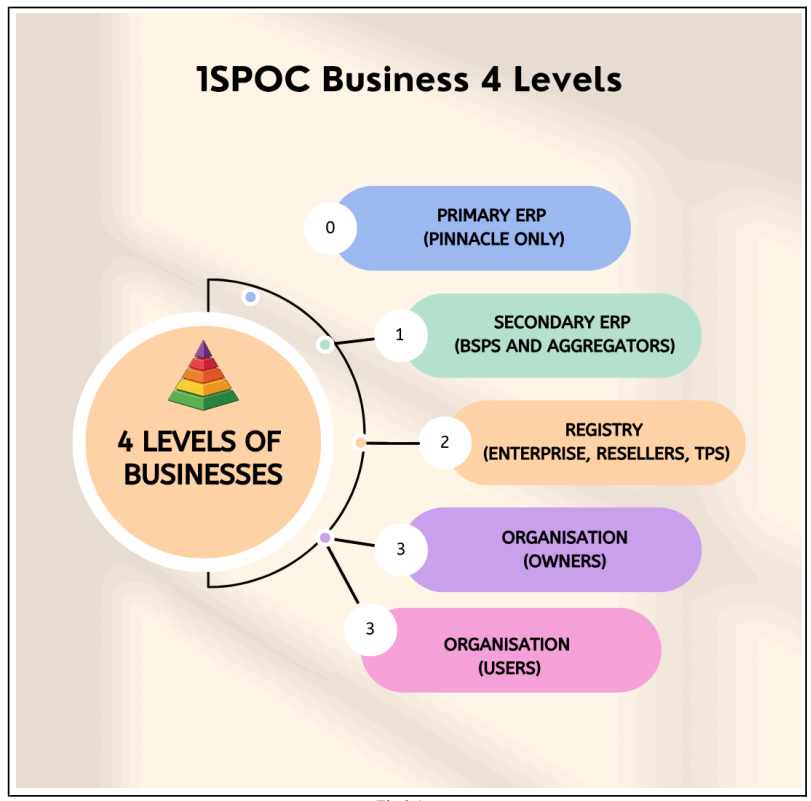
Level 0: Primary ERP (Pinnacle Only)
Portal Access: erp.1spoc.in
➔ Primary ERP is a management application to be used by Pinnacle Teleservices Pvt. Ltd. only
➔ It helps Pinnacle Teleservices Owner to onboard its Users, Applications, Sources, Providers/BSPs, Rates, and Secondary ERPs
➔ Users can be 1 Owner, Multiple Admins, Sales Support, Billing Support, Tech Support; when these users log in, they see items related to their interest
➔ The owner can onboard multiple Admins and Users; Admins can onboard multiple Users
➔ As of today, there are 7 Applications: WhatsApp, RCS, SMS, Live Agent Chat, Multi-Channel Chatbots, Process, and Ads Manager
➔ Sources are for each Application that are used to deliver messages to end-users and receive messages from end-users (e.g., the Source for WhatsApp is Meta)
➔ Each Source has a Rate Card where Base Rates that are publicly available are defined
➔ Provision to upload Rate Cards for 6 different currencies for Sources
➔ Providers/BSPs are for each Application that is used to interact with the Source; they are one level above the Source
➔ Each Application interacts with the Provider, and the Provider, in turn, communicates with the Source (e.g., Pinnacle WhatsApp BSP interacts with Meta)
➔ BSP/Provider provides extra services to the Applications that Source may not provide
➔ Each Provider has its own Rates; the Rate Card of the Provider is prepared from the Source Rates
➔ Provision to upload Rate Cards for 6 different currencies for Providers
➔ Provider also gets Discounts on Source Rates; the Discounts are used to see the actual invoice of the Provider charged by the Source
➔ Primary ERP has a single Billing Unit set to INR
➔ All Secondary ERPs are created within this Billing Unit
➔ Primary ERP Owner and Admins can onboard Secondary ERPs
➔ Each Secondary ERP, when onboarded, is set with one currency out of 6 currencies
➔ Each Secondary ERP has a single Billing Unit that follows the same currency
➔ Billing Unit can be of three types: Prepaid, Postpaid without Limit, Postpaid with Limit (as of now, only Postpaid without Limit is supported)
➔ Each Secondary ERP gets Apps (WhatsApp, RCS, SMS, Livechat, AdsManager, Bots, Process) from the Primary ERP
➔ Each App is connected to a single Provider; each specific values are set here
➔ Each Provider automatically follows the same currency that is assigned to Secondary ERP during onboarding and uses that currency's Rate Card
➔ Each App in the Secondary ERP is given new Rates by the Primary ERP
➔ Each Secondary ERP can have a dedicated deployment Copyright @2025 Pinnacle Teleservices Pvt. Ltd. All rights reserve
➔ Each Secondary ERP portal gets a custom domain and provision to white-label their landing page
➔ Each Secondary ERP has one Owner-user by default, who can log in to perform further activities
➔ Each Secondary ERP has a separate database
➔ Primary ERP Owner and Admins can view the Invoices of each Secondary ERP
➔ Each App has a Platform Fee per month that Primary ERP sets for the Secondary ERP
➔ The Invoice for each Secondary ERP contains mainly the App Platform Fees
Level 1: Secondary ERP (BSPs and Aggregators)
Portal Access: serp.1spoc.in
➔ Secondary ERP can onboard Registries (Enterprise, Reseller, TPs)
➔ Secondary ERP Owner can create multiple Admins; both can create multiple Users of type Billing Support, Tech Support, Sales Support
➔ Owner and Admins can onboard Registries
➔ Secondary ERP has a single Billing Unit; all Registries are created within this Billing Unit
➔ Each Registry gets Apps
➔ Each App has a Platform Fee per month that Secondary ERP can assign to the Registry
➔ Each App has a Rate Card that Secondary ERP can assign to the Registry
➔ Secondary ERP Owner and Admins can view the Invoices of each Registry
➔ Each Registry is mapped to a custom domain
➔ Each Registry can customise its landing page
➔ The Invoice for each Registry contains mainly the App Platform Fees
Level 2: Registry (Enterprise, resellers, TPS)
Portal Access: 1spoc.in
➔ Registry can onboard Organisations
➔ Each Registry has a single Billing Unit
➔ All Organisations are onboarded within this Billing Unit
➔ Registry Owner can onboard Admins; both can onboard Users of type Billing Support, Sales Support, Tech Support
➔ Registry gets Apps from Secondary ERP
➔ In the MyApps section, Registry can view the Platform Fee for each App and the Rate Cards of each App given by Secondary ERP
➔ In the Registries section, Registry Admin and Owner can onboard Organisations, with each Organisation having one Owner by default
➔ Registry Owner and Admin can view each Organisation's Invoices
➔ The Registry can assign each Organisation Platform Fee per CU and Rates for each App
➔ The invoice for each Organisation contains Platform Fees for all Consumer Units and charges incurred based on Rates from the Rate Cards, and the consumption
➔ All APIs exposed by the Application are white-labeled using the Registry domain
➔ Each Organisation is allotted Apps by the Registry Owner or Admin
➔ Apps do not have individual Platform Fees; Platform Fee is charged based on the number of Consumer Units created by the Organisation
Level 3: Organisation (Enterprises)
Portal Access: 1spoc.in
➔ Organisation is allowed to use Applications, and by default, there is one Default Billing Unit in an Organisation
➔ There is one Owner of the Organisation who can onboard Admins
➔ Both Owners and Admins can onboard additional users with roles such as Billing Support, Sales Support, and Tech Support.
➔ In the MyApps section, each App's Rate Cards can be viewed
➔ The Owner and Admin can activate the Apps given by the Registry
➔ Once the App is activated, the name of the App starts appearing on the left navigation bar
➔ Clicking the App name displays multiple tabs
➔ Each App has a different number of tabs (e.g., WhatsApp has Waabas and Consumer Units tabs)
➔ In the Waabas tab, new Waaba IDs and their numbers can be added using the embedded signup
➔ In the Consumer Units tab, new Consumer Units can be created and linked to the Waaba number
➔ Tech Support Users can be assigned to the Consumer Unit
➔ Each Consumer Unit must be created within a Billing Unit
➔ Each Consumer Unit is linked to an Application
➔ Tech Support User assigned to the Consumer Unit can start using the Application attached to the Consumer Unit after logging in
➔ Owner and Admin can view the analytics of each Consumer Unit separately and all Consumer Units together in one place
➔ The Owner and Admin can create multiple Billing Units in an Organisation
➔ Consumer Units can be created within any Billing Unit
➔ Each Consumer Unit has a Platform Fee
➔ Invoices are viewable from the Billing Unit card in the UI